
Stop Configuration Drift Before It Costs You: Meet Senserva Drift Manager

A Note from Clay:
We're excited to welcome back Rod Trent as a guest contributor to the Senserva blog. For those who don't know Rod, he's a Senior Program Manager for Cybersecurity and AI at Microsoft, works on Copilot for Security, and co-hosts the Microsoft Security Insights Show. He also wrote "Must Learn KQL" and several other books on Microsoft security. Rod brings a valuable third-party perspective on configuration drift and what we're doing with Drift Manager. It's helpful to have someone who lives and breathes Microsoft security products take a fresh look at our approach and explain why this stuff matters in practical terms. We asked him to dig into the problem space, and we think his analysis will resonate with you. Look for more from Rod as we explore how organizations can better manage security in Microsoft environments. Take it away Rod!
Picture this: You've got your Microsoft 365 or Entra ID environment dialed in perfectly—everything locked down for security and compliance. Then, seemingly out of nowhere, an admin makes a quick change, someone shares a file they shouldn't, or Microsoft pushes an update that shifts things just a bit. Next thing you know, you're vulnerable, and you might not even realize it until it's too late. Reports show that misconfigurations play a role in over 80% of data breaches, and a lot of that comes down to configuration drift. The gradual shift away from your intended setup.
In environments like Microsoft 365, Entra ID, and broader identity setups, drift isn't some rare glitch; it's just part of how things evolve. Admins tweak settings for new needs, teams collaborate in ways that loosen permissions, and Microsoft rolls out changes to improve things. Over time, these add up, creating gaps between what you planned and what's actually running.
That's why it's worth paying attention to: It can open doors to attacks, like an overlooked account with too much access, or expose data through sloppy sharing. On the compliance side, if you're dealing with standards like GDPR, HIPAA, SOC 2, PCI-DSS, ISO 27001, or even the Essential Eight, drift can throw you off track and complicate audits.
Senserva has seen this play out in real organizations. A financial firm they worked with had a breach because an old policy let someone in who shouldn't have been there and ended up with fines and a lot of cleanup. Or a healthcare group where Entra ID settings drifted, messing up their access logs and delaying important certifications. These aren't edge cases; they're common in fast-moving setups where changes happen constantly.
Why Older Ways to Handle Drift Don't Quite Cut It
Most teams have tried the usual approaches, but they often leave you one step behind.
Manual reviews, for example, or going through configs by hand against your baseline. In a setup with hundreds or thousands of users, groups, and policies, it's tough to keep up. It's time-intensive and easy to miss things.
Then there are periodic scans with tools like Microsoft Secure Score or scripts you run yourself. You get a report, spot problems, and fix them. But by the time you act, more changes have likely happened. It's reactive, not preventive.
Some third-party tools pull your data out for analysis, which can feel risky, especially if you're in a regulated space and don't want config details leaving your environment.
What we all need is something more proactive that fits the reality of these dynamic Microsoft setups.
How Senserva Drift Manager Helps
That's where Senserva Drift Manager comes in. Senserva was founded by Mark Shavlik, who started Shavlik Technologies, a pioneer in patch management that he built and sold to VMware back in 2011. Building on that experience in security automation, and as members of the Microsoft Intelligent Security Association (MISA), they have focused on tools that work deeply within the Microsoft ecosystem.
Drift Manager keeps an eye on your Microsoft 365, Entra ID, and identity configurations in real time, spotting deviations as they happen and even fixing them automatically if you want (or routing them for approval). Everything is processed right inside your tenant. No data heads out to external servers, which keeps things secure and simple for compliance.
It's built with three main ideas in mind:
- Real-time monitoring and remediation: It watches 24/7 and can correct issues right away or fit into your workflows.
- All processing stays in your tenant: Secure by design, no extra risk from data export.
- Quick to get going: Agentless setup means you can deploy in minutes and start getting value fast.
They include a library of ready-to-use rules based on best practices (like CIS benchmarks and Microsoft guidance), covering areas from permissions to conditional access. You can add your own custom rules too, in straightforward YAML format.
It's especially handy for managed service providers (MSPs) and those handling multiple tenants. They support multi-tenant views and management from one place, making it easier for channel partners to keep client environments in check.
The dashboard is straightforward: clear views of your setup's health, details on drift events, remediation history, and trends. It ties into tools like Teams or ServiceNow if needed.
Real Results They've Seen
One major retailer cut configuration-related issues drastically in the first month. Their CISO said it felt like having extra vigilance on their Entra ID without the manual effort. They caught and fixed a risky permission change automatically.
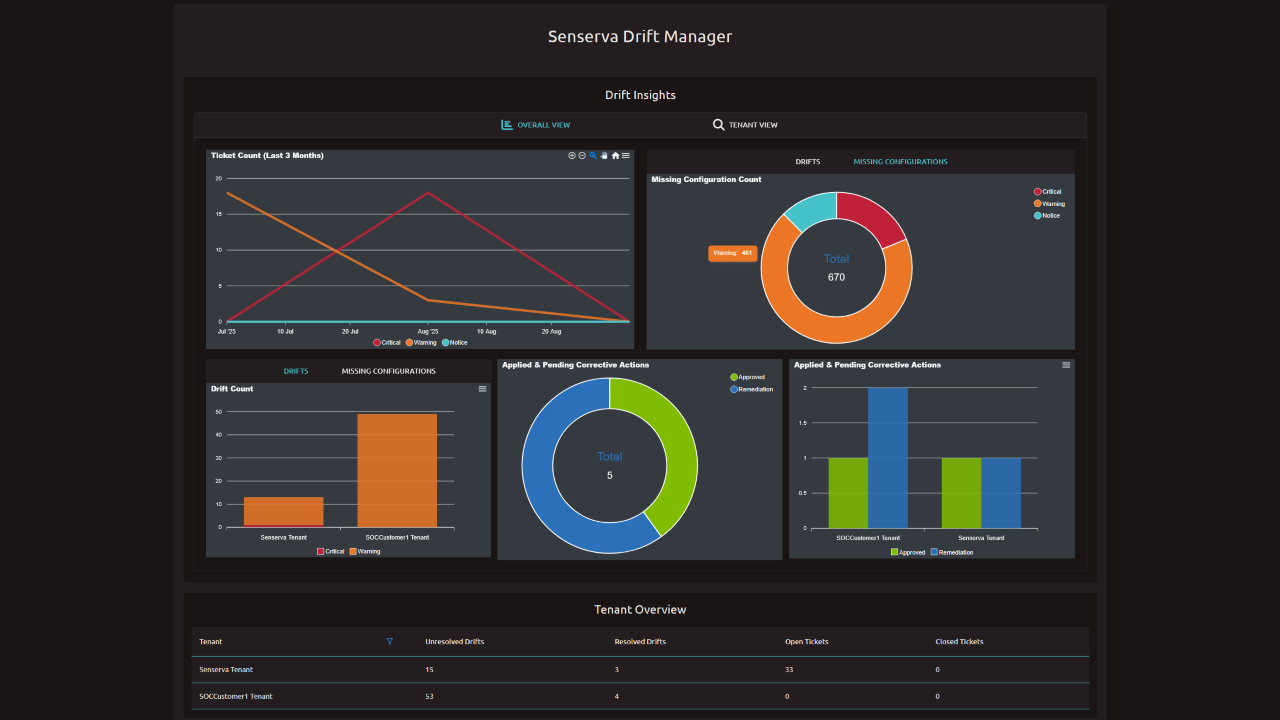
And here's a quick demo:
These kinds of outcomes hold up across different sizes of organizations.
Ready to Give It a Try?
If drift sounds familiar and you'd like a better handle on it:
-
- Book a quick 15-minute demo: They show it in your context and answer questions—schedule HERE.
Wrapping Up
Configuration drift is one of those ongoing challenges in Microsoft environments—driven by constant change and capable of creating real security and compliance headaches. Older methods like manual checks or snapshot scans help but don't fully keep pace. With Senserva Drift Manager's in-tenant, real-time approach, you can stay on top of it without added complexity.
Look forwards to more posts coming on things like custom rules, integrations, and real-world stories. In the meantime, keeping drift managed is one of those practical steps that makes a big difference in cybersecurity. Thanks for reading!